
Setting up the Medesync integration
Request the integration
Fill out the Integration Request Form to send your request to our team. If you have issues with the form, email our Customer Success Team for assistance.
Click: Integration Request Form
Note: You will need your Medesync Organisation ID.
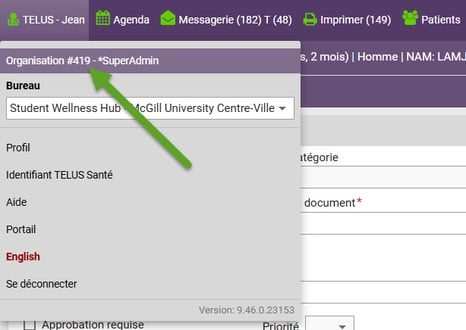
- Once the request form is signed, we will handle the paperwork and submit it to Telus.
- Telus will connect your EMR, which may take up to 10 business days.
- You will receive a confirmation email when the integration is complete.
Steps to Launch Tali in Medesync
- Log in to Medesync.
- Open an appointment from the Agenda.
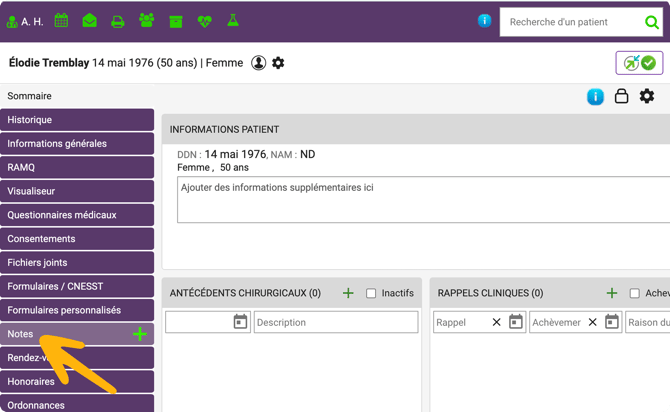
- Once the patient chart opens, go to the sidebar on the left side and click Notes.
- Click the Add (+) button to create a new note.
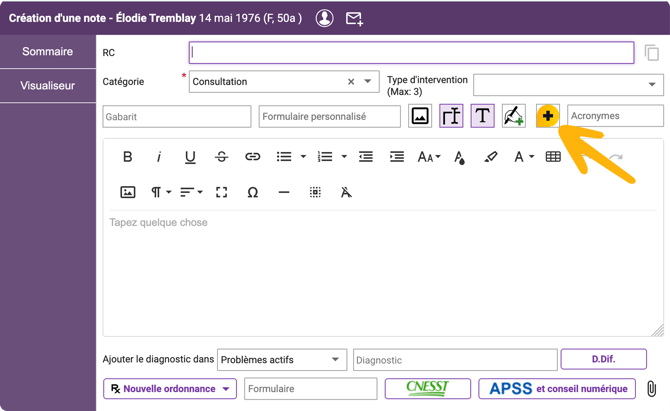
- In the new note, click the Tali icon to launch Tali.
- After signing into Tali once, you’ll be logged in automatically.
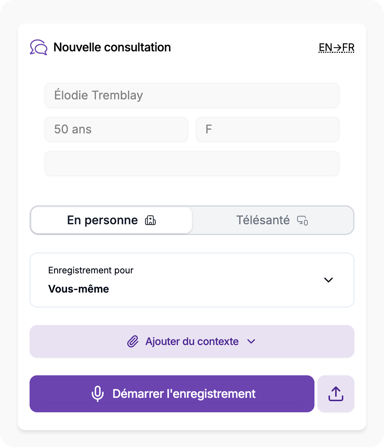
Click here for our guide on how to Record patient notes using Tali with Medesync
Getting help
- Need a Tali AI account? Create one by following these instructions.
- Need support? Contact Tali’s Customer Success Team here
- Having trouble with your EMR? Visit our troubleshooting guide here