
How it works
You can type or paste details into the Add additional context box to ensure your final note is complete. This information is included at the end of your transcript and used to generate your clinical note, but it remains private from the patient.
Use this feature to capture:
- Patient demeanor or physical observations.
- Follow-up actions or pending lab results.
- Relevant details from previous transcripts or charts.
Steps to add context
- Open the Add additional context box.
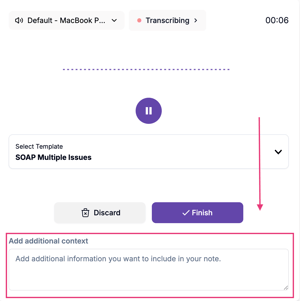
- Type or paste your clinical details.
- Generate your note as usual. Tali will automatically incorporate the added context into the final summary.
|
Situation |
Action |
|
Information does not appear in the note |
This may occur if the information provided is not relevant to the note. If you believe the information is relevant and it still does not appear, contact support so we can investigate. |
|
Deciding what to include |
You can include any information that you want to be reflected in the final note. |