
Follow these steps to check a patient’s health card status within the Tali Web or Desktop application.
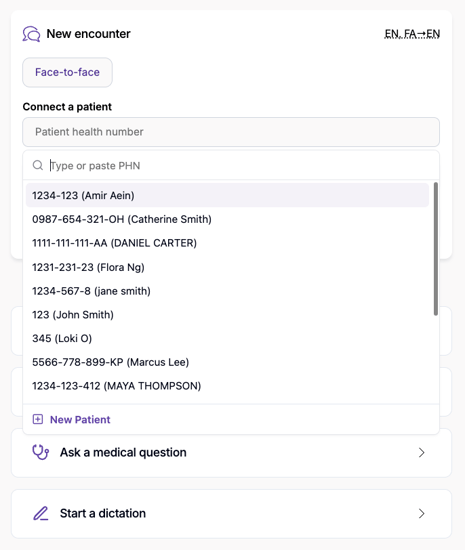
1. Select a Patient
Search for your patient by entering their name or OHIP number in the search bar. You can perform this search at any point in your workflow:
-
Before the encounter: To ensure data is ready for billing.
-
During the encounter: While confirming details with the patient.
-
After the encounter: Before final submission of the claim.
2. Automatic Validation
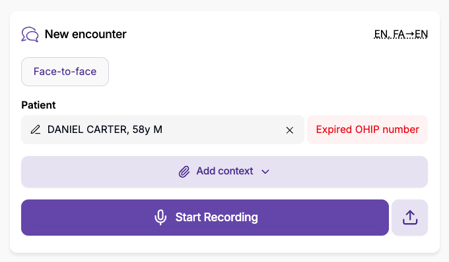
Once a patient is selected, Tali automatically communicates with the Ministry of Health (MoH) to check the validity of the health card. This real-time check is designed to catch errors early and help you avoid unnecessary "Error 50" or "Error 65" rejections down the line.
3. Review and Update Information
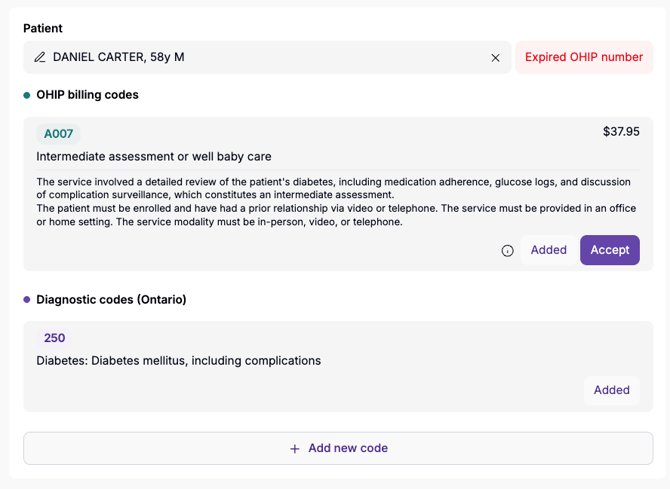
If Tali identifies an issue with the health card, you can view the details directly in the interface. To make changes:
-
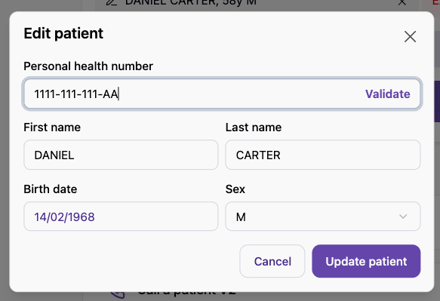
Click on the Pen Icon to open the edit menu.
-
Update the patient information as needed.
-
Click Revalidate to run the check again with the updated details.
Note: Updating information in Tali only updates the record within the Tali platform. You must manually update your Electronic Medical Record (EMR) system to ensure your permanent patient records remain accurate.
Common Health Card Validation Messages
Tali will display specific codes from the Ministry of Health to help you identify why a card might be invalid. Common status codes include:
-
10: HEALTH NUMBER DOES NOT EXIST
-
53: HEALTH CARD EXPIRED
-
55: CARDHOLDER NEEDS TO UPDATE ADDRESS
-
65: VERSION CODE INVALID
-
99: VALIDATION SYSTEM UNAVAILABLE (Try again later)
Important Considerations
-
Syncing with the MoH: When a patient updates their information with the Ministry of Health, it may take several business days for the MoH directory to reflect these changes. If a card still shows as invalid after an update, please allow a few days for the system to refresh.
-
Requirements: This feature is currently available for family physicians in Ontario. To access the Real-time Billing Agent, your Tali account must be integrated with MC EDT.