
Designed for clinicians who work in web-based EMRs, the extension allows you to access Tali without switching between applications or browser tabs. Whether you're documenting a patient encounter, reviewing billing opportunities, completing forms, or managing your schedule, Tali remains accessible directly within your browser.
The Chrome Extension is particularly well suited for clinicians using web-based EMRs such as CHR, Med Access, Juno, OSCAR Pro, and other browser-based clinical systems.
What Is the Unified Experience?
The Unified Experience combines the convenience of Tali's Chrome Extension with the full capabilities of Tali's platform.
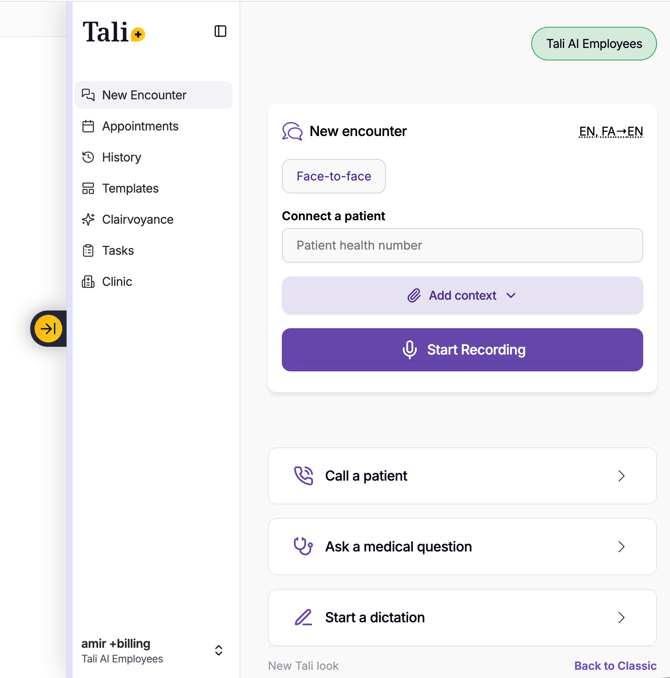
Instead of moving between different Tali experiences to access specific features, clinicians can access documentation, billing, forms, templates, appointments, and administrative tools from a single workspace.
As new capabilities are released in Tali, they become available through the Chrome Extension, ensuring users always have access to the latest tools without changing how they work.
Why Use the Chrome Extension?
Many clinicians spend most of their day working inside a web-based EMR. The Chrome Extension is designed to complement that workflow by keeping Tali accessible at all times.
With the extension, you can:
- Access Tali directly alongside your EMR
- Reduce the need to switch between browser tabs and applications
- Keep documentation, billing, and administrative workflows in one place
- Directly dictate into any field in your EMR (Read more about direct dictation)
For clinicians using browser-based EMRs, the extension often becomes the primary way of interacting with Tali throughout the day.
Key Features
Real-time Billing Agent
Review billing recommendations directly within the extension as part of your clinical workflow.
Billing Agent helps identify billing opportunities, supports accurate claim submission, and makes it easier to capture eligible revenue without disrupting documentation.
Universal Dictation
Use Tali's dictation capabilities anywhere you work, including EMRs, forms, referral letters, emails, and other browser-based applications.
Forms and Form Previews
Create, complete, and review forms without leaving your workflow.
Form previews allow you to review information before submission or export.
Custom Template Builder
Build and manage your own documentation templates to support consistent charting across patient encounters.
Appointment Management
View upcoming appointments and navigate between patients directly from the extension.
Task Management
Manage clinical and administrative tasks from a single workspace.
Call a Patient
Access patient calling functionality directly within Tali when enabled by your organization.
Favorite Templates
Quickly access frequently used templates and workflows.
Dynamic Resizable Workspace
The Chrome Extension adapts to the task you're performing.
When additional space is needed for activities such as reviewing forms or managing templates, the extension can expand to provide a larger workspace. During routine workflows, it remains compact and accessible alongside your EMR.
This allows you to access powerful functionality without sacrificing screen space.
To resize the window, move your mouse towards the left-edge of the extension window, and drag it to your desired size.
Tali's extension will remember the size you chose for it among all Chrome tabs.
Frequently Asked Questions
Which EMRs work best with the Chrome Extension?
The Chrome Extension is ideal for web-based EMRs, including CHR, Med Access, Juno, OSCAR Pro, and other browser-based clinical systems.
Do I need to install the Tali web app?
No. The Chrome Extension provides access to Tali's core capabilities directly within your browser.
Will my existing extension workflows still work?
Yes. Existing extension functionality remains supported while providing access to additional Tali capabilities.
Who can access the Unified Experience?
The Unified Experience is available to all Tali Chrome Extension users.
Will future Tali features be available in the extension?
Yes. New features released in Tali will be made available through the Chrome Extension, helping users stay up to date without changing their workflow.