
Note: IP allowlisting is an enterprise security feature configured by request.
Enabling IP allowlisting
To set up an allowlist for your clinic or health system, please contact your Tali representative. This feature allows your organization to restrict access to trusted environments, such as your clinic’s Wi-Fi or VPN, reducing the risk of unauthorized or off-site access.
How it works
IP allowlisting ensures that healthcare providers can only access Tali from approved network locations.
- Login access: If a healthcare provider signs in from a non-approved network, a message will appear after authentication explaining that Tali must be accessed from a secure clinic network.
- Active sessions: If a healthcare provider moves off-site or disconnects from the VPN while using Tali, the app will block further interactions until they return to an approved network.
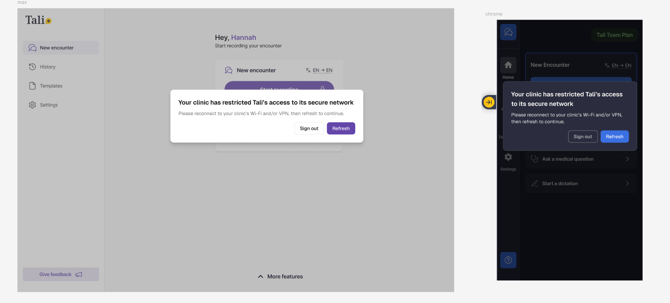
- Regaining access: Once back on a valid network, the healthcare provider can click Refresh to resume their work.
| Situation | Action |
|---|---|
| Clinic wants to restrict access to Tali to trusted networks | Contact your Tali representative to request IP allowlisting for your clinic or health system. |
| User tries to log in from a non-approved network | After authentication, a message will appear explaining that Tali must be accessed from a secure clinic network |
| User disconnects from clinic Wi-Fi or VPN during an active session | Tali will block further interactions until the user reconnects to an approved network. |
| User leaves the clinic while still logged in | Access will be restricted until the user returns to an approved network or reconnects to the VPN. |
| User has returned to a valid network but cannot continue working | Click Refresh in the app to resume the session. |
| IT team needs to update or modify allowed IP ranges | Contact your Tali representative to adjust the IP allowlist settings. |