
Most follow-up visits are about one thing: how has the patient changed since last time? But most notes make you re-document the entire story from scratch, every single visit. Progress Note reads the patient's earlier notes and builds today's note around what's actually different — improved, worsened, unchanged, or newly reported — so the record reflects the visit you just had, not the one three months ago. Less re-typing, a clearer picture of progress over time, and a note that stays as short as the visit warrants.
What it does
Progress Note is a template for return visits and ongoing care. I t compares today's encounter against the patient's previous documentation, so the note focuses on what has changed since the last visit rather than repeating everything from scratch.
It's built for the visits where the story is progress over time.
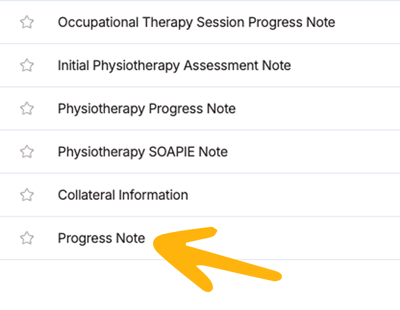
Before you start: Tali has two type of progress note templates. Progress Note compares today's visit against the patient's prior notes to show what's changed. Specialty Progress Notes (Mental Health, Physiotherapy, Nutrition, and others) document today's visit only, in a discipline-specific format — no comparison. Pick Progress Note for progress over time; pick a specialty template for a specialty-shaped single visit.
 When to use it
Reach for this template when the patient has been seen before and today is about following up:
- Chronic disease reassessments
- Medication reviews or dose adjustments
- Post-treatment or post-procedure check-ins
- Therapy or specialty follow-up visits
- Any visit where "how has this changed since last time?" is the point
For a brand-new patient, a first consult, or an intake assessment, use a consult, intake, or specialty assessment template instead.
Progress Notes vs. Specialty Progress Notes
These can look similar in the template dropdown, so it's worth knowing the difference before you record.
Progress Note compares today's encounter against the patient's previous notes to describe what has changed since the last visit. It's the right choice whenever progress over time is the point.
Specialty Progress Notes — Mental Health, Physiotherapy, Nutrition, and others — work from today's conversation only and don't reference prior notes. What sets them apart is a fixed, discipline-specific section layout and specialty prompts (for example, standardized screening scales or discipline-specific headings) rather than the general follow-up structure.
Use a specialty template when your discipline expects a particular note shape and you want a single visit captured in that format. They're the right choice for documenting today's visit in a specialty-native structure, whether or not the patient has been seen before.
The key difference: only Progress Note references prior notes to document change. If you want the note to reflect how the patient has progressed since a previous visit, choose Progress Note. If you want a specialty-specific structure for a single visit, choose the matching specialty template.
How it uses prior visit notes
When earlier documentation is available, Tali uses it as a baseline — the reference point that gives words like improved, worsened, or unchanged their meaning. It draws on:
- The most recent previous Progress Note, and/or
- Notes from earlier visits
How to generate one
- Start an Ambient Scribe recording in Tali.
- Open the template dropdown on the recording screen.
- Select Progress Note. You can select up to four templates at once if you'd like multiple note versions.
- When the visit is finished, click Done to generate the note.
What the note includes
The note is organized around follow-up, with these sections:
Reason for Follow-Up — Why the patient is being seen today, the condition(s) or treatment(s) under review, and the interval since the last visit, when stated.
Progress Since Last Visit — What has changed for the issues discussed today, labelled where supported as improved, worsened, unchanged, or newly reported. Includes concrete comparisons where available, such as home blood pressure readings, weights, symptom counts, or durations.
Current Status and Relevant Findings — The patient's current condition, plus today's vitals, physical exam findings, and any labs or imaging reviewed at this visit (using exact test names and values). Ordered-but-pending investigations go in the plan instead.
Response to Treatment — Effectiveness, adherence, and any side effects of current treatments, including medications (documented exactly as stated) and non-drug interventions such as therapy or lifestyle measures.
Assessment — The clinician's impression and trajectory (for example, well controlled, improving, inadequately controlled, or stable), where the conversation supports it.
Plan and Next Steps — Medication changes, ordered investigations, referrals, patient education, lifestyle recommendations, and follow-up timing — only what was explicitly discussed.
Tali only documents information from the encounter. If something wasn't mentioned, it won't be invented.
Tips for a better note
Speaking a few things aloud helps Tali describe change precisely:
- What was done at the last visit, and prior values where useful (for example, "last visit her blood pressure was 150/90")
- How the patient has responded since then
- Current symptoms and their functional impact
- Exam findings and results reviewed today
- Exact medication names, doses, and any changes
- Follow-up timing and what will be reassessed next
Customizing the note
You can shape the template to match your charting style:
- Structure — bullet points or paragraphs
- Sentence style — compact phrases or full sentences
- Pronoun preferences
- Level of detail — concise or extended
Custom instructions change the format and style. The note still only documents what was said in the encounter.