
Why use Form Preview?
Form Preview helps you:
-
Access what the form requires while the encounter is still in progress
-
Capture form-specific details when they are easiest to confirm
-
Reduce missed information in longer or more detailed forms
-
Support more complete form generation after the encounter
-
Spend less time reviewing notes, charts, and patient details after the visit
-
Keep form completion connected to the same workflow as your encounter documentation
How it works
-
Start an encounter: Begin recording as usual.
-
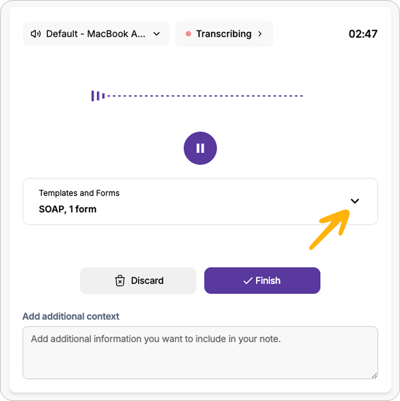
Open Templates and Forms: Select the Templates and Forms dropdown during the encounter.
-
Choose a form: Go to the Forms tab and select the form you want Tali to complete.
.png?width=400&height=391&name=Screenshot%202026-04-29%20at%208.45.50%20PM%201%20(1).png)
-
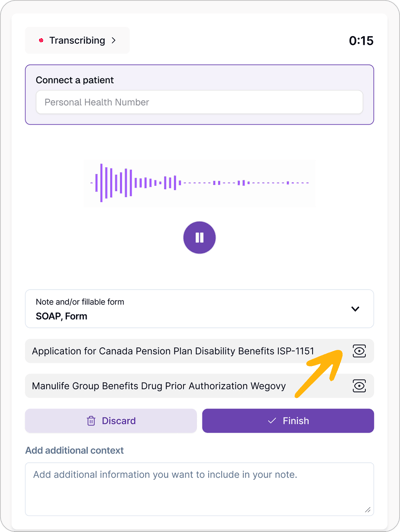
Preview the form: Open the selected form to review its sections and required fields while the encounter is still recording.
-
Capture key details: As you review the form, mention any information that should be included, such as relevant history, symptoms, medications, dates, or functional impacts.
.png?width=400&height=334&name=Screenshot%202026-04-29%20at%208.47.58%20PM%201%20(1).png)
-
Finish the encounter: When you select Finish, Tali uses the transcript to help generate the completed form.
FAQ
Does Form Preview fill out the form during the encounter?
No. Form Preview lets you review the form during the encounter. The form is generated after you finish the encounter.
Can I preview a form while recording?
Yes. You can open and review the form while the encounter continues recording.
Can I select more than one form?
Yes. You can select multiple forms from the Forms tab.
What happens if information is missing?
If a detail is not captured in the transcript, the related field may need to be reviewed or completed manually.