
How it works
The Generate menu still allows each template to be used only once per encounter. After you generate a document, such as a referral letter, that template will no longer appear as an option in the Generate menu.
To support encounters that require multiple documents of the same type, Tali identifies documents that may be needed from the encounter and adds them as Documentation tasks.
Each Documentation task has its own document action, allowing you to generate another document using the same template.
For example, an encounter may include separate tasks to:
- Prepare a cardiology referral
- Prepare a psychiatry referral
- Prepare an orthopedics referral
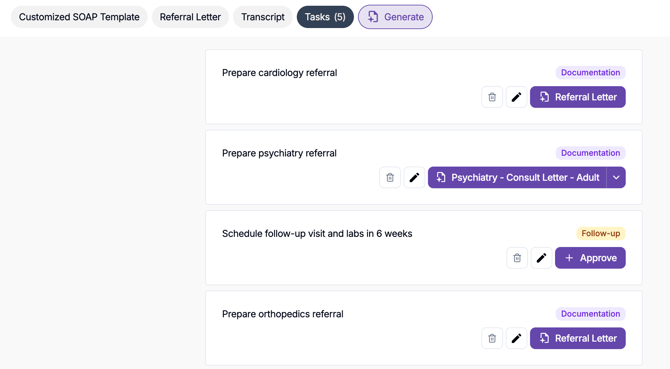
Each referral can be generated as a separate document, even when the same referral-letter template is used.
Generate a document from a task
- Open the Tasks tab within the encounter.
- Find the relevant Documentation task.
- Select the document action displayed on the task.
- Choose a template from the dropdown when multiple templates are available.
- Tali generates the document and opens it in a separate tab within the encounter.
- Repeat these steps for any additional documentation tasks.
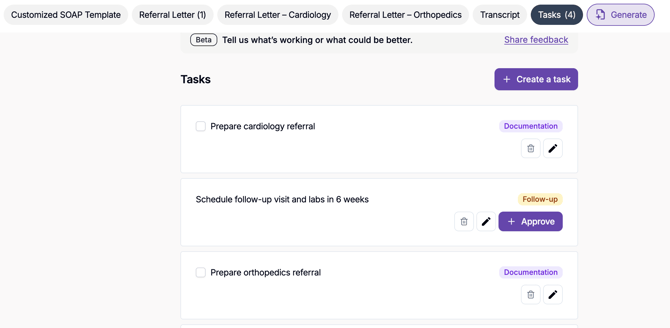
Each generated document can be reviewed and edited independently.
Note: After a template has been used through the standard Generate menu, it may no longer appear there for that encounter. Use the associated documentation tasks to generate additional documents from the same template.