
Note: This requirement currently only applies to providers who selected Quebec as their province during account creation. It is only required on the web app and desktop app.
How to confirm consent
Follow these steps to complete your encounter:
-
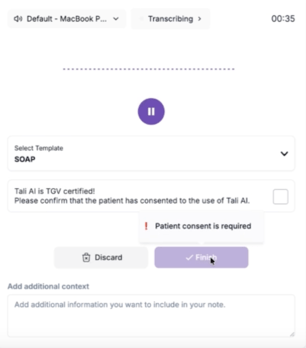
Open the recording UI for your encounter.
-
Locate the consent checkbox before clicking Finish.
-
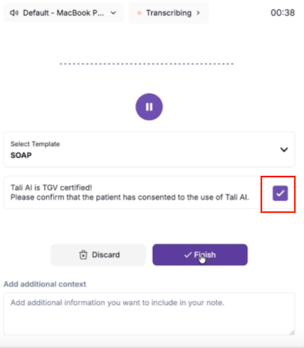
Select the checkbox to confirm you have collected patient consent.
-
Click Finish to save your note.
Why this is required
This step ensures Tali remains compliant with TGV regulations, allowing us to continue supporting your practice in Quebec. While we understand this adds an extra step to your workflow, it is a necessary requirement for official operations within the province.
Availability
This feature is active on the following platforms:
-
Web App
-
Desktop App
It does not currently apply to the mobile app, browser extension, or SDK integrations.
Getting help
-
Need support? Contact Tali’s Customer Success Team here.