
Note: To have this feature (clinic-wide calling number setup) enabled for your clinic, please ask your clinic admin to send a request to product@tali.ai with the subject line "Clinic Calling Number Admin Request."
The clinic calling number is the verified number patients see when anyone in your clinic calls them through Tali. An admin verifies it once, and it becomes the default for every clinician in the clinic.
Tali uses an offer model: the clinic calling number is the shared default, but each clinician can still switch to their own verified number or to Care provider (Tali's default number) for their own calls.
This article covers:
- Verifying the clinic calling number (admins)
- Requesting a clinic number if you're not an admin
- Understanding the name patients see
Verify the clinic calling number (admins)
- Open Settings and go to Caller ID.
- On the Clinic calling number card, select Verify a number.
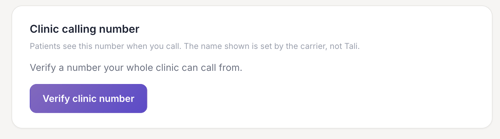
- Enter the clinic phone number.
- Choose how to receive your verification code:
- Text (SMS) — Tali sends a code by text.
- Call — Tali calls the number with a code. If the line uses an extension, enter it so the call reaches the right place.
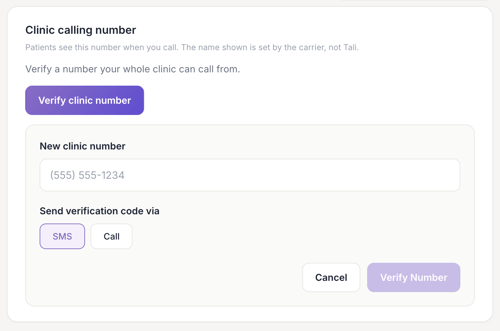
- Enter the code to confirm.
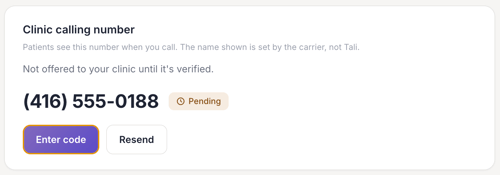
Once verified, the clinic calling number becomes the default for everyone in the clinic. Clinicians can still choose a different number for their own calls, verification sets the default, it doesn't lock it.
Not an admin?
Only clinic admins can verify the clinic calling number for the whole clinic. You can still veritfy the clinic number individually or ask your clinic admin to verify the clinicn numebr fo you. Once they do, you will see it as an option in your setting.
If you'd rather call from your own line instead, you can verify a personal number yourself. You can switch between personal, clinic, and Tali's default numbers.
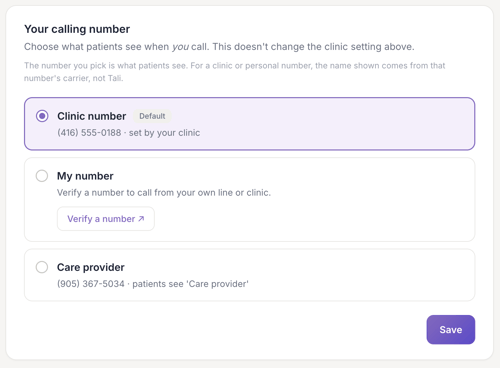
Understand the name patients see
Note: The name patients see on an incoming call from the clinic number is set by the phone carrier, not by Tali.